Setting Pan/Tilt Limits via the Desktop Control App (Legacy)
The Desktop Control App is a legacy way to set Pan/Tilt Limits on a PTZOptics camera. If you're looking for the quickest way to set Pan/Tilt Limits, see the Pan/Tilt Limits guide for your camera instead — for example, Move 4K or Move SE.
You can download the desktop control application here: Free Camera Control App Download for PC and MacOS - PTZOptics
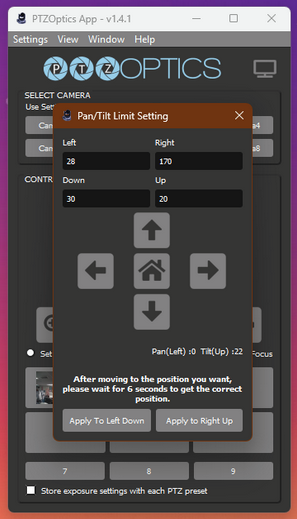
Note: It is possible to use this application to set pan/tilt limits from Settings > Pan/Tilt Limit Setting, but it will not allow you to set a right limit in the left hemisphere or a left limit in the right hemisphere, only one pan limit per hemisphere. This behavior is consistent across G3 and G2 cameras. Consider using other methods.